
Hey all!
There are sometimes stubborn misunderstandings or wrong assumptions in IT which are difficult to get rid off. ROPG and ADFS Federated Azure AD tenants is one of them.
Hence this quick post to elaborate the different scenarios to configure Jamf Connect for ROPG, subject to how the tenant is synced or federated.
To kick this off I’d like to list the different options which matter in view of how ROPG should be configured, either targeting Azure (Provider key in plist set to ‘Azure’), or targeting ADFS (Provider key in plist set to ‘Custom’).
The main thing impacting our options here is whether or not ‘Federation’ is enabled:

If enabled, this means that the ‘USER SIGN-IN MECHANISM’ for authenticating users to Azure AD is following the federation. Hence the authentication will happen ON THE ADFS SERVER.
This means that for instance for OIDC authentications, you’ll see a redirect to the ADFS login page (ignore the JPRO logo, it’s a left over from playing with custom branding):


Now, for ROPG this causes some challenges as doing an ROPG call against Azure, with a federated user (see below for the exception in view of ‘Staged Rollout’), simply DOES NOT WORK unless you have enabled AllowCloudPasswordVallidation. I blogged about this in 2020 when I was exploring the technicalities and learning more about ADFS: https://travellingtechguy.blog/jamf-connect-with-adfs-federation-and-allowcloudpasswordvalidation/
In the mean time the official Jamf documentation has followed an also discusses this requirement here: https://docs.jamf.com/technical-articles/Password_Hash_Sync_Enablement_in_Your_Azure_AD_Domain.html
As we speak there still seems to be some misunderstanding on this going on, so I’d really like to make this very clear:
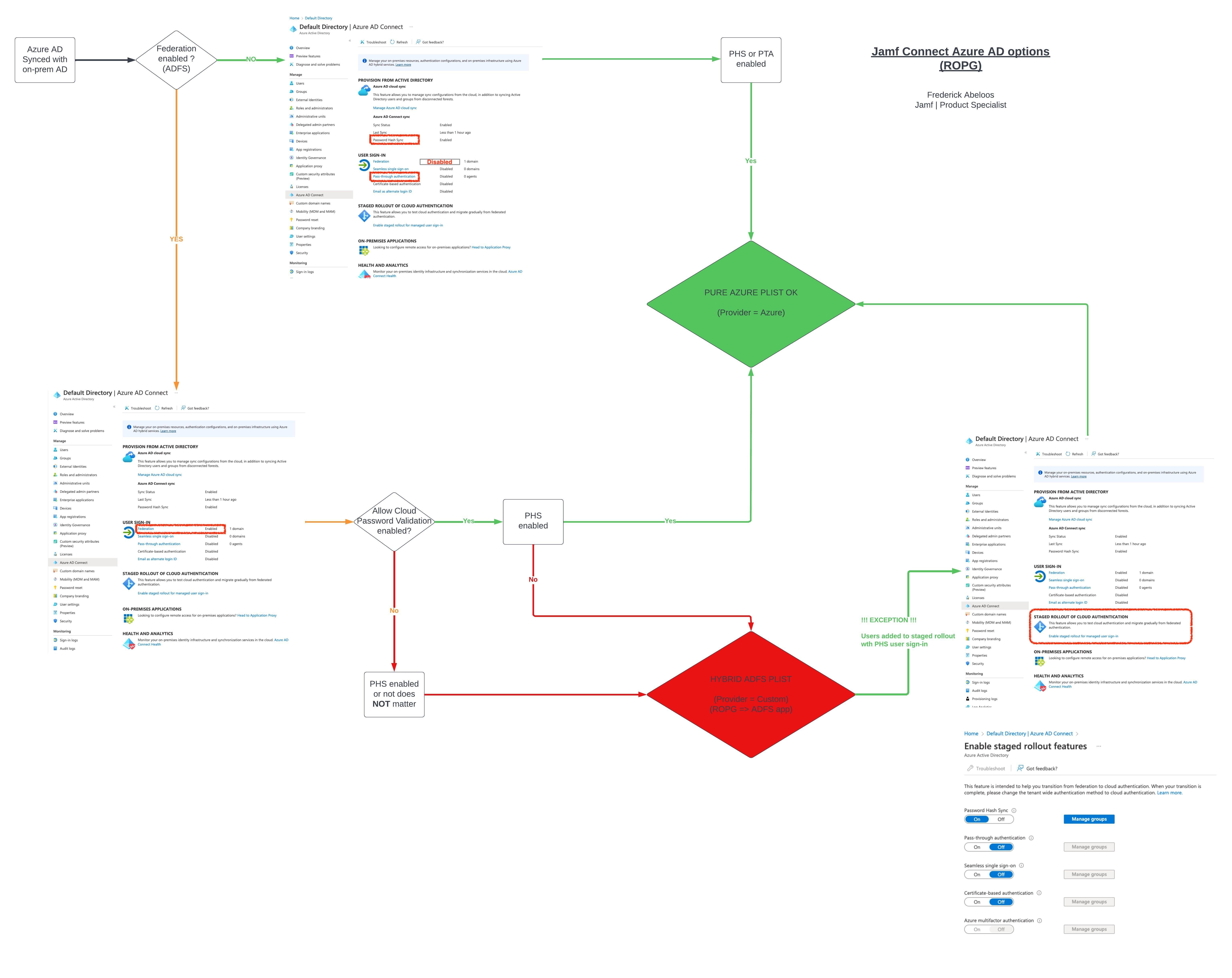
If your Azure AD Tenant is federated with ADFS, regardless of whether Password Hash Sync is enabled or not, FEDERATION ENABLED = > you need ‘AllowCloudPasswordValidation’ to be enabled on your ADFS farm if you want to set the provider in the plist to ‘Azure’ for ROPG.
For JCL:

<key>OIDCProvider</key>
<string>Azure</string>

or for JC Menu Bar:

<key>Provider</key>
<string>Azure</string>
If you do not want to, or you can not enable AllowCloudPasswordValidation then it does not matter if PHS is enabled or not, you will need to do a full hybrid setup where we point ROPG to an app on the ADFS farm, and not to Azure. For this, the provider for ROPG will need to be set to CUSTOM:
For JCL:

<key>OIDCProvider</key>
<string>Custom</string>

or for JC Menu Bar:

<key>Provider</key>
<string>Custom</string
Full examples:
- Jamf Connect Login
<?xml version="1.0" encoding="UTF-8"?>
<!DOCTYPE plist PUBLIC "-//Apple//DTD PLIST 1.0//EN" "http://www.apple.com/DTDs/PropertyList-1.0.dtd">
<plist version="1.0">
  <dict>
    <key>OIDCAdmin</key>
    <string>Admin</string>
    <key>OIDCAdminAttribute</key>
    <string>roles</string>
    <key>OIDCClientID</key>
    <string>1d884884-aaaa-bbbb-cccc-71548a60aa76</string>
    <key>OIDCNewPassword</key>
    <false/>
    <key>OIDCProvider</key>
    <string>Azure</string>
    <key>OIDCROPGID</key>
    <string>3490645c-aaaa-bbbb-cccc-c5f8863d428f</string>
    <key>ROPGDiscoveryURL</key>
    <string>https://adfsttg.travellingtechguy.dev/adfs/.well-known/openid-configuration</string>
    <key>ROPGProvider</key>
    <string>Custom</string>
    <key>AllowNetworkSelection</key>
    <key>OIDCTenantID</key>
    <string>af72a024-aaaa-bbbb-cccc-fd66bf369fcc</string>
    <true/>
  </dict>
</plist> - Jamf Connect Menu Bar:
<?xml version="1.0" encoding="UTF-8"?>
<!DOCTYPE plist PUBLIC "-//Apple//DTD PLIST 1.0//EN" "http://www.apple.com/DTDs/PropertyList-1.0.dtd">
<plist version="1.0">
<dict>
	<key>IdPSettings</key>
	<dict>
		<key>DiscoveryURL</key>
		<string>https://adfsttg.travellingtechguy.dev/adfs/.well-known/openid-configuration</string>
		<key>Provider</key>
		<string>Custom</string>
		<key>ROPGID</key>
		<string>3490645c-aaaa-bbbb-cccc-c5f8863d428f</string>
	</dict>
	<key>Kerberos</key>
	<dict>
		<key>AutoRenewTickets</key>
		<true/>
		<key>Realm</key>
		<string>TRAVELLINGTECHGUY.DEV</string>
	</dict>
</dict>
</plist>
The reason why I say that it does not matter if PHS is enabled or not, is because I see there is a big misunderstanding from time to time regarding the difference between:
- PHS as USER SIGN IN mechanism (hence Federation DISABLED)
- PHS as additional sync between Azure AD and On-prem AD, on top of Federation as User SIGN IN mechanism
To illustrate this, have a look at Azure AD Connect, the tool you use to configure the link and sync between On-prem and Azure AD.
Under the User Sign-In you can only select 1 option. It’s either PHS OR PTA OR Federation. There is NO PHS AND federation, which makes sense as you configure how the user authenticates… against Azure or against ADFS…


So when troubleshooting Jamf Connect and ADFS Federated tenants, there is NO “I have Federation and PHS”… at least not for the USER SIGN IN mechanism.
There is however the additional optional sync which you can configure (and most organisations do):


Enabling this however does not mean you can set the Provider to ‘Azure’ for ROPG if you do not have ‘AllowCloudPasswordValidation’ enabled on the ADFS farm.
What matters is what Azure AD is showing under ‘USER SIGN IN’.

If that shows ‘Federation Enabled’ you do need ‘AllowCloudPasswordValidation’ or a hybrid config with custom provider keys as per above.
Now, there is an exception! Of course there is, and that is is ‘Users added to Stage Rollout of Cloud Authentication’:


Users or user groups added to staged rollout, even if federation is enabled, do not require AllowCloudPasswordValidation to be enabled as they will authenticate – also for ROPG – against Azure. Here both PHS and PTA can be used.
One more thing, for AllowCloudPasswordValidation to work, PHS as additional sync option (see above) needs to be enabled and the password needs to be hashed in Azure. But for all details about this I’d like to refer to my old 2020 post on the matter: https://travellingtechguy.blog/jamf-connect-with-adfs-federation-and-allowcloudpasswordvalidation/
Quick Flowchart to summarise this:

That’s it! I hope this clarifies things once and for all.
As always, if you liked the post, hit the like button, tell your friends about it and leave a comment down below!
Brgds,
TTG

Apple ecosystem enthusiast, geek, tech gadget freak, Belgian living in the Netherlands
Manager Technical Support | Jamf